Note
This page was generated from a Jupyter notebook.
Trim Envelope and Climb Analysis
This notebook demonstrates how to:
Generate a trim envelope across a range of altitudes
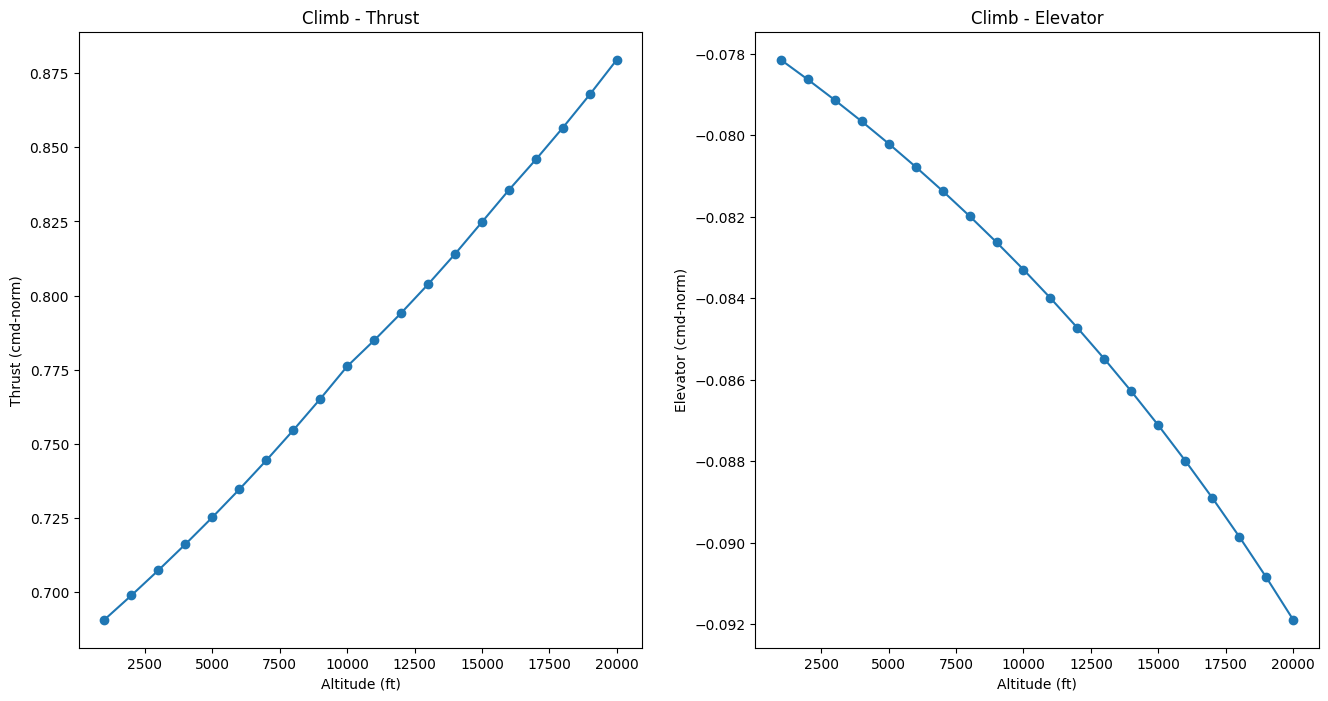
Analyze the required throttle and elevator settings
Simulate climbing from 1,000 ft to 20,000 ft using initial trim settings
Simulate climbing using interpolated trim settings from the envelope
Import Required Libraries
[1]:
import jsbsim
import matplotlib.pyplot as plt
import numpy as np
import math
Initialize JSBSim and Set Up Aircraft
[2]:
AIRCRAFT_NAME="A4"

fdm = jsbsim.FGFDMExec(None)
fdm.set_debug_level(0) # Suppress verbose JSBSim console output

fdm.load_model(AIRCRAFT_NAME)


# Set engines running
fdm['propulsion/set-running'] = -1
     JSBSim Flight Dynamics Model v1.3.1.dev1 Apr 16 2026 08:58:01
            [JSBSim-ML v2.0]

JSBSim startup beginning ...
Define Envelope Limits and Parameters
[3]:
# Set alpha range for trim solutions
fdm['aero/alpha-max-rad'] = math.radians(12)   # Maximum angle of attack in radians.
fdm['aero/alpha-min-rad'] = math.radians(-4.0) # Minimum angle of attack in radians.

# Set envelope limits
speed = 300         # KCAS
min_alt = 1000      # Set the minimum alt (ft).
max_alt = 20000     # Set the maximum alt (ft).
alt_step = 1000     # Set the altitude step (ft).
gamma = 5           # Set the flight path angle range (deg).
Generate Trim Envelope
Compute trim solutions across the altitude range for a constant speed and flight path angle.
[4]:
# Trim results
results = []  # Initialize an empty list to store the trim results.

# Iterate over a range of altitudes and for each speed a range of flight path angles (gamma)
for alt in range(min_alt, max_alt+1, alt_step):
    # Set the initial conditions
    fdm['ic/h-sl-ft'] = alt         # altitude above sea level (ft)
    fdm['ic/vc-kts'] = speed        # calibrated airspeed (kts)
    fdm['ic/gamma-deg'] = gamma     # flight path angle (deg)

    # Initialize the aircraft with initial conditions
    fdm.run_ic()

    # Trim the aircraft.
    try:
        # 1 means straight flight by using all changeable control variables.
        fdm['simulation/do_simple_trim'] = 1

        results.append((alt, fdm['fcs/throttle-cmd-norm[0]'], fdm['fcs/pitch-trim-cmd-norm']))

    except jsbsim.TrimFailureError:
        pass  # Ignore trim failures
Plot Trim Envelope Results
Display the required throttle and elevator settings as functions of altitude.
[5]:
# Extract the trim results
alt, throttle, elevator = zip(*results)

plt.rcParams["figure.figsize"] = (16, 8)  # Set the figure size for matplotlib plots.

# Plot the trim envelope results, with required thrust and AoA indicated via a colormap
fig, (axThrust, axElevator) = plt.subplots(1, 2)  # Create a figure with two subplots (thrust and AoA)

# Graph data for each of the sub plots (title, ax, data)
graph_data = [ ('Thrust', axThrust, throttle), ('Elevator', axElevator, elevator) ]

for title, ax, data in graph_data:
    ax.plot(alt, data, marker='o')
    ax.set_xlabel('Altitude (ft)')
    ax.set_ylabel(f'{title} (cmd-norm)')
    ax.set_title(f'Climb - {title}')

plt.show()  # Display the plot.
Define Flight Simulation Functions
Function 1: Climb with Initial Trim
This function climbs from 1,000 ft to 20,000 ft using only the initial trim solution at 1,000 ft.
[6]:
def fly_initial_trim(speed, gamma):

    # Set the initial conditions
    fdm['ic/h-sl-ft'] = 1000        # altitude above sea level (ft)
    fdm['ic/vc-kts'] = speed        # calibrated airspeed (kts)
    fdm['ic/gamma-deg'] = gamma     # flight path angle (deg)

    # Initialize the aircraft with initial conditions
    fdm.run_ic()

    # Trim the aircraft.
    fdm['simulation/do_simple_trim'] = 1

    climb_results = []

    while fdm['position/h-sl-ft'] < 20000:
        fdm.run()
        climb_results.append((fdm['position/h-sl-ft'], fdm['velocities/vc-kts'], fdm['flight-path/gamma-deg']))

    alts, speeds, gammas = zip(*climb_results)

    fig, (axSpeed, axGamma) = plt.subplots(1, 2)

    axSpeed.plot(alts, speeds)
    axGamma.plot(alts, gammas)

    axSpeed.set_ylabel('KCAS (kt)')
    axSpeed.set_xlabel('Altitude (ft)')

    axGamma.set_ylabel('Gamma (deg)')
    axGamma.set_xlabel('Altitude (ft)')

    plt.show()
Function 2: Climb with Interpolated Trim
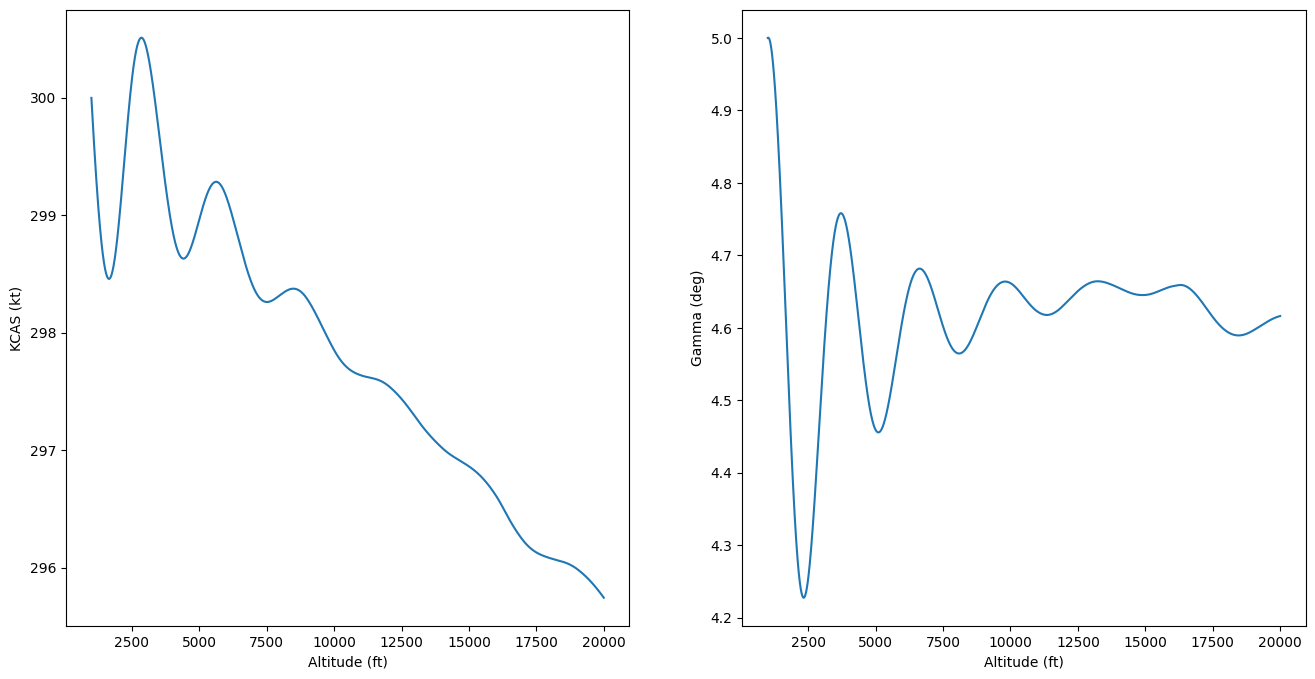
This function climbs from 1,000 ft to 20,000 ft using interpolated throttle and elevator commands from the trim envelope.
[7]:
def fly_interpolated_trim(speed, gamma, alt, throttle, elevator):

    # Set the initial conditions
    fdm['ic/h-sl-ft'] = 1000        # altitude above sea level (ft)
    fdm['ic/vc-kts'] = speed        # calibrated airspeed (kts)
    fdm['ic/gamma-deg'] = gamma     # flight path angle (deg)

    # Initialize the aircraft with initial conditions
    fdm.run_ic()

    # Trim the aircraft.
    fdm['simulation/do_simple_trim'] = 1

    interp_climb_results = []

    while fdm['position/h-sl-ft'] < 20000:
        fdm.run()

        # Interpolate
        throttle_cmd = np.interp(fdm['position/h-sl-ft'], alt, throttle)
        elevator_cmd = np.interp(fdm['position/h-sl-ft'], alt, elevator)

        fdm['fcs/throttle-cmd-norm'] = throttle_cmd
        fdm['fcs/pitch-trim-cmd-norm'] = elevator_cmd

        interp_climb_results.append((fdm['position/h-sl-ft'], fdm['velocities/vc-kts'], fdm['flight-path/gamma-deg']))

    alt, speeds, gammas = zip(*interp_climb_results)

    fig, (axSpeed, axGamma) = plt.subplots(1, 2)

    axSpeed.plot(alt, speeds)
    axGamma.plot(alt, gammas)

    axSpeed.set_ylabel('KCAS (kt)')
    axSpeed.set_xlabel('Altitude (ft)')

    axGamma.set_ylabel('Gamma (deg)')
    axGamma.set_xlabel('Altitude (ft)')

    plt.show()
Execute Climb Simulations
Run the interpolated trim climb simulation. You can uncomment the initial trim function to compare results.
[8]:
# Uncomment the line below to run the initial trim climb
# fly_initial_trim(speed, gamma)

# Run the interpolated trim climb
fly_interpolated_trim(speed, gamma, alt, throttle, elevator)